SaskTel maxTV app
Enjoy entertainment on the go, anywhere in Canada.
Watch on your phone, tablet, or TV.
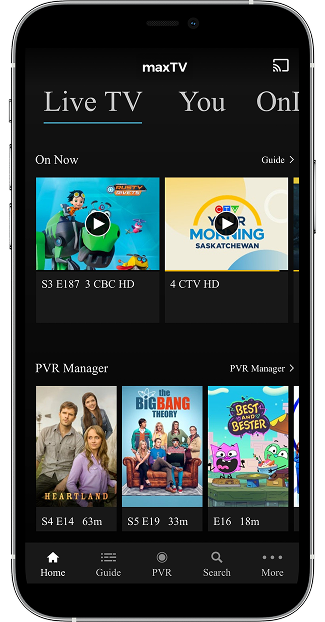
- Stream over 125 live HD channels, including local news and live sports1
- Binge your favourite series and access the newest movies on demand1
- Watch, set, and manage PVR recordings2
- Restart select currently airing shows from the beginning
- Watch on your TV or streaming device with Google Cast or Apple AirPlay 3*
Included free for all maxTV and maxTV Stream subscribers. Get started.
Get the app!



To access and use the maxTV app through your phone or tablet, you must:
- Have an active maxTV or maxTV Stream subscription to log into the maxTV app.
- Register for mySASKTEL and connect your TV account.
- Be a Residential SaskTel customer (not available to Business customers).
- Have an Internet connection.
A total of 5 devices can be logged into the maxTV app at the same time, and a maximum of 3 devices can be streaming content at the same time.
Using the maxTV app on a wireless network may incur data charges. Check the wireless terms of service with your provider. SaskTel wireless customers can use the mySASKTEL app to check data usage.
1Access to content depends on TV subscription. Available for use in Canada only. Due to agreements with content providers, some content that is available on your in-home maxTV set-top box or maxTV Stream media box may not be available on the SaskTel maxTV app.
2Not all PVR recordings are viewable on the maxTV app due to agreements with content providers. PVR recordings are available to watch on the maxTV app for 30 days for maxTV subscribers and 365 days for maxTV Stream subscribers.
3The Google Cast and Apple AirPlay feature requires the casting and display devices to be on the same network. The display device must be compatible with Google Cast and Apple AirPlay. Only content available on the maxTV app is available for casting.